
Reimagining Mobile Authentication: From Password Reset Hell to Passwordless Login
How we fixed a cumbersome password reset flow by eliminating passwords
- Role
- Product Design Manager
- Company
- pMD
- Platforms
- iOS & Android
- Timeline
- 3 phases over 2 months
Overview
This case study shows how I transformed pMD's mobile login from a frustrating 8-step password reset nightmare into a simple passwordless system that actually works for healthcare providers and patients.
The Problem We Almost Solved Wrong
What We Thought Was Wrong
I initially thought users couldn't find the "Forgot Password" link on the login screen. Simple fix, right? Just make it more obvious.
What Was Actually Wrong
When users did find the "Forgot Password" link, they fell into this absurd flow:
- Enter phone number in pMD app
- Tap "Forgot Password" → kicked out to Safari
- Re-enter the same phone number you just typed
- Land on a page where you literally can't do anything
- Leave to check Messages app for the reset link
- Tap link → back to Safari to create new password
- Hit another dead-end page with tiny text explaining what to do next
- Return to pMD app and enter your new password
Users bounced between 3 different apps. They had to re-enter information. They hit multiple dead ends with no clear next step.
For a provider who just got a new phone and hasn't used their password in years (because they've been using Face ID), this was genuinely terrible.
Our Decision
Instead of making a broken flow more discoverable, I decided to get rid of passwords for most login scenarios. Address the root cause, not the symptom.
Phase 1: Implementing OTP-Based Authentication
What We Built
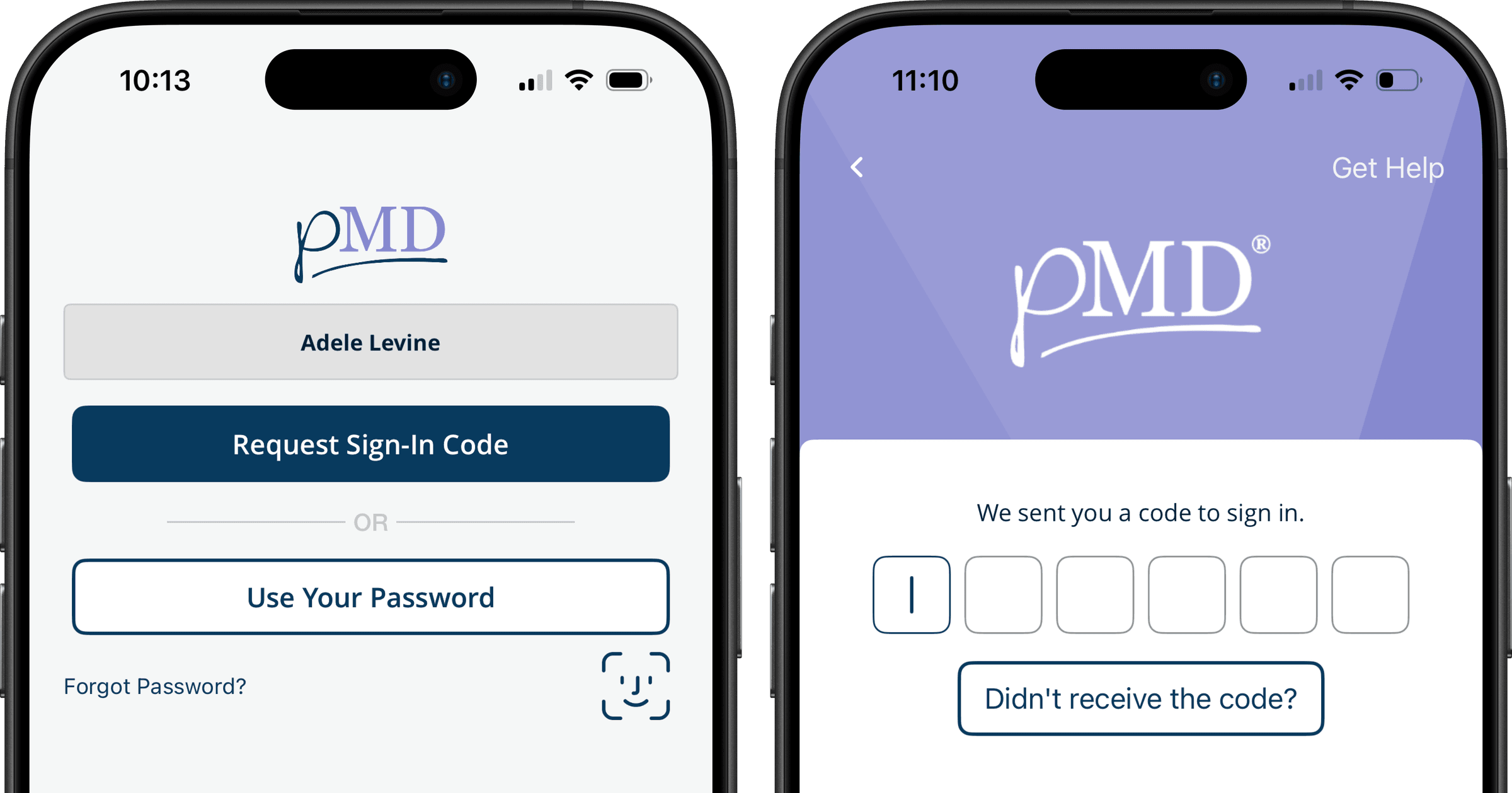
The new flow:
- Enter phone number → get OTP via SMS
- Code appears above keyboard on iOS or auto-fills on Android
- Tap it once, you're in
- Technical infrastructure note: During implementation, we discovered that many patients weren't receiving codes because their carriers were blocking messages from Twilio, our original OTP provider. We switched to Telnyx, which significantly improved SMS delivery reliability and reduced "didn't receive code" issues.
If something goes wrong, "Didn't receive code?" gives you:
- Resend code
- Try another phone number
- Use your password (for people who want to)
After your first login: We ask if you want to enable Face ID/Touch ID so you never have to deal with codes again.
What Changed
- No more bouncing between apps
- Login went from 8 steps to 3
- Password became optional, not required
Phase 2: Making Auto-Fill Obvious
Even with auto-fill working perfectly, users kept leaving the app to manually check their texts. They just didn't see the code sitting right there above the keyboard on iOS.
Every time someone left the app, they had to:
- Remember the code
- Switch back
- Type it in manually
- Hope they didn't mess up a digit
In healthcare, where people are busy and stressed, this added friction we didn't need.
What We Built
Big, clear instruction text:
"No need to leave the app—your code will show up here in a moment. Just tap on it!"
Animated arrows that pulse every second, pointing right at where the code appears above the keyboard.
Only shows up when:
- You're on a phone (not iPad - different behavior there)
- The keyboard is visible
- You're focused on the code entry field
On small screens: We hide the pMD logo to make room for the arrows and text. The guidance is more important than branding at this moment.
Why This Worked
The animation interrupts the learned behavior of "got a text = check Messages app." It literally points people to the right spot. And once they use it successfully once, they get it for next time.
Phase 3: Email OTP as Backup
The Remaining Problem
SMS worked great... until it didn't:
- In hospital basements with no signal
- SMS just randomly failing sometimes
- VOIP numbers that don't get texts
These weren't common, but when they happened, users were stuck and would call into support.
What We Built
Email OTP as a smart backup:
When you tap "Didn't receive code?" the system checks if we have your email. If yes, you see "Send code by email." If no email on file, you don't see the option.
The flow:
- Try SMS first (no change here)
- Don't get it? Tap "Didn't receive code?"
- If we have your email, you can request it there instead
- Get the code, enter it, you're in
We kept SMS as the default because it's faster and people expect it. Email is just there when you need it.
Impact
By The Numbers
- 95% fewer password reset support tickets in 6 months, freeing up our support team to focus on more complex user needs.
- 20 seconds faster average login
What People Experienced
- Login went from a multi-app nightmare to actually simple
- No more getting stuck with no way forward
- Works whether you have signal or not
- Most people set up Face ID and never think about it again
Improved Security
Moving to OTP-based authentication with biometric options actually strengthened our platform security compared to the old password-only system, while simultaneously making the experience easier for users.
Infrastructure Improvements
During Phase 1 implementation, we also switched our OTP provider from Twilio to Telnyx. We'd been getting frequent reports from patients whose carriers were blocking Twilio messages, resulting in codes that never arrived. The switch to Telnyx dramatically improved SMS delivery reliability.
What We Learned
Obvious solutions aren't always right
Making "Forgot Password" bigger would have sent more people into a terrible flow. Taking time to understand why people struggled led us to remove passwords instead of optimizing around them.
Just because it works doesn't mean people know it works
****Auto-fill was there the whole time. Users just didn't see it. Sometimes good design is just pointing at what's already there.
Edge cases matter in healthcare
****Most people got their SMS fine. But for the doctor in a basement or the nurse traveling abroad, the email backup was the difference between "can't log in" and "no problem."
Keep it simple for most people, but have a backup plan
****90% of users just tap the SMS code and they're done. The other 10% have options when they need them.